
When an AI Agent Calls 10 Tools, Where Does the Data Actually Go?
AI agents can call multiple tools, APIs, databases, and third-party services to complete a single task. But as data moves through each step, sensitive information can end up in prompts, tool calls, logs, traces, memory, and systems that never actually needed the original value. This article explores why controlling data flow is becoming a critical part of AI agent security.
By Securelytix
An AI agent receives a simple request:
“Find my latest invoice, check whether the payment went through, and send me an update.”
Behind that one request, a lot can happen.
The agent may call an LLM to understand the task. Then it may search a CRM for customer details, access a billing platform, retrieve information from a database, call an email service, and write traces or logs for monitoring.
One request.
Multiple systems.
Multiple copies of data.
And that raises a question that is becoming increasingly important as AI agents become part of production applications:
When an AI agent calls 10 different tools, where does the data actually go?
The answer is rarely as simple as “from the user to the AI model.”
Data can move across the entire agent workflow. It may enter prompts, tool arguments, API requests, responses, logs, tracing platforms, memory systems, and third-party services. In many cases, teams have visibility into the systems they intentionally connected—but far less visibility into every place where sensitive data is copied along the way.
Let's follow what actually happens.
One Request Can Create an Entire Data Trail
Let's take a closer look at what happens after a user sends that request.
“Find my latest invoice, check whether the payment went through, and send me an update.”
For a human employee, this might mean opening a few applications and checking the relevant information.
For an AI agent, the process can look very different.
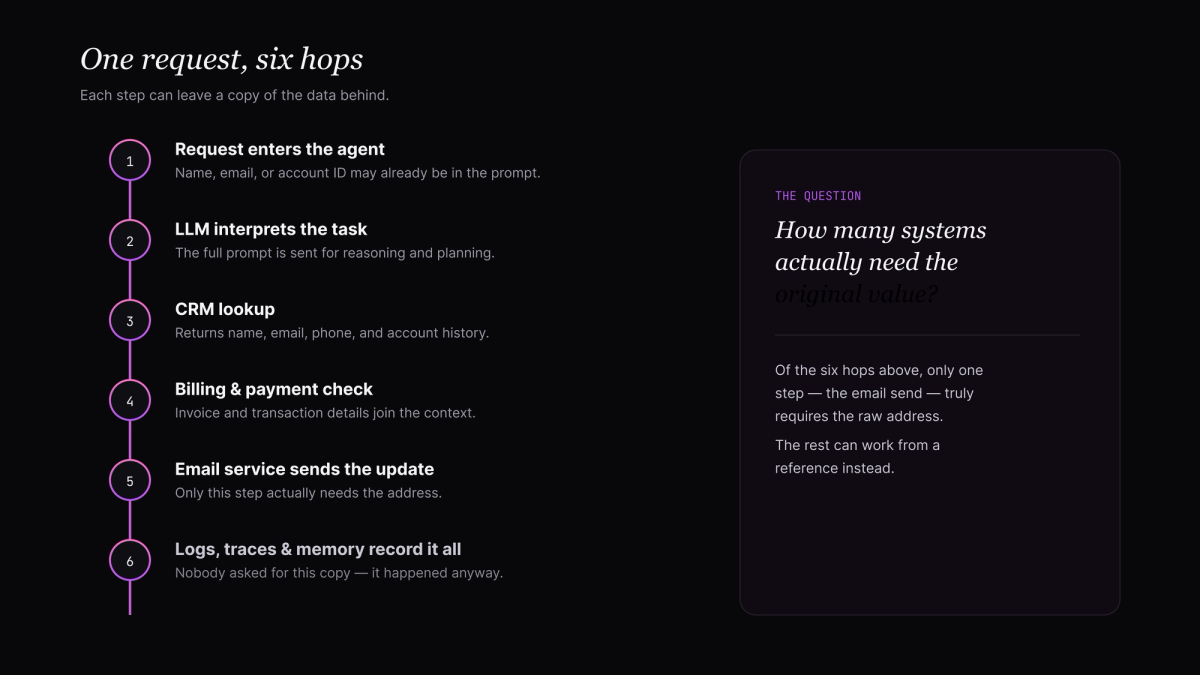
First, the user's request may be sent to an LLM so the agent can understand what needs to be done. The request itself might already contain identifying information, such as a name, email address, account number, or customer ID.
The agent then begins planning.
It may call a CRM to identify the customer. Next, it could query a billing system for invoice information. It might access a payment API to check the transaction status. Finally, it may use an email or messaging service to send the response.
A simplified workflow might look like this:
User → Application → AI Agent → LLM → CRM → Billing API → Payment System → Email Service
But that is only the visible part of the workflow.
Behind the scenes, information may also be sent to:
- Agent memory
- Application logs
- API logs
- Observability and tracing platforms
- Error monitoring tools
- Analytics systems
- Databases
- Third-party services connected to the agent
This means a single piece of customer data may not exist in just one place during execution.
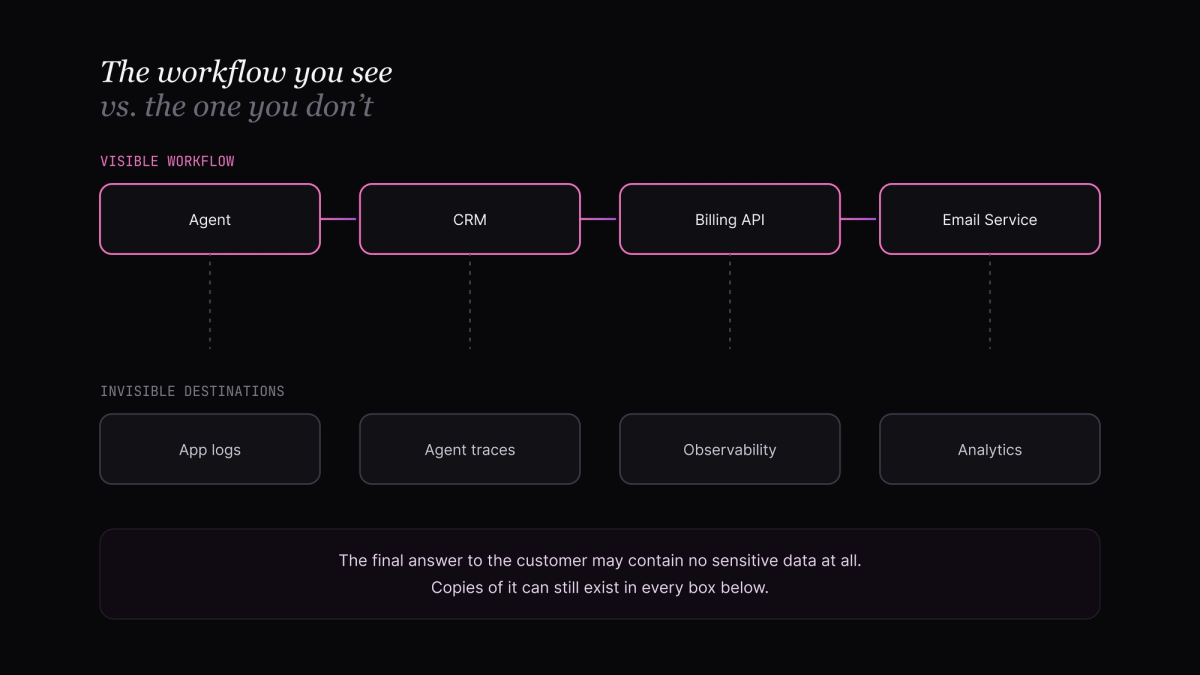
The customer's email address, for example, could appear in the original request, the LLM prompt, a CRM lookup, a tool call, an API response, and several logs created while the agent completes the task.
And when an agent calls multiple tools, this data trail can grow quickly.
The important point is that data exposure is not always caused by a system being compromised.
Sometimes, sensitive information is simply travelling exactly as the application was designed to send it.
The agent needs information to complete a task. Each tool needs context to perform its function. Logging systems need enough detail to help developers debug failures.
Individually, each step may seem reasonable.
But when you look at the entire workflow together, a different question appears:
How many systems actually need access to the original sensitive value?
That question becomes much harder to answer when an AI agent is making decisions and calling tools dynamically.
The Agent Is Not Just Passing Data It Is Deciding Where to Send It
Traditional applications usually follow relatively predictable workflows.
A user clicks a button. The application calls a specific API. The API returns a response.
With an AI agent, the path can be less predictable.
The agent may decide which tools to call based on the user's request, the information returned by previous tools, and the instructions it has been given. One tool call can influence the next.
For example, an agent handling a customer support request might do something like this:
- Read the user's request.
- Call the LLM to understand the task.
- Search the CRM for the customer.
- Retrieve recent orders.
- Check payment status.
- Search internal documentation for a relevant policy.
- Create a support ticket.
- Send an update to the customer.
At every stage, data can move forward.
The CRM response may contain the customer's name, email address, phone number, account ID, and purchase history. The agent may use some of that information to decide what to do next.
But unless controls are in place, the entire response could potentially become part of the context passed to another system.
For example:
CRM → Agent → LLM → Next Tool Call
The next tool may only need an account ID.
But the agent may be carrying much more context than that.
This is one of the challenges with agentic systems. The problem is not only who has access to the data. It is also about how much data is being carried from one step to another.
A tool might return ten fields when the agent only needs two.
An API response might contain a full customer record when the next step only requires a transaction ID.
A large amount of context can gradually accumulate as the agent works through a task.
This creates a principle that becomes increasingly important in agent workflows:
A system should receive only the data it needs for the operation it is performing.
Without that separation, every additional tool can potentially become another destination for information that was never necessary for that tool to see in the first place.
And once sensitive data starts moving through multiple steps, another problem appears.
Even if the agent completes the task correctly, what happens to all the copies and traces created along the way?
The Invisible Destinations: Logs, Traces, and Memory
The tool calls are only part of the story.
When teams map an AI agent workflow, they usually focus on the systems the agent is intentionally connected to: the CRM, database, payment platform, internal knowledge base, or email service.
But sensitive data can also end up in systems that are not directly involved in completing the user's request.
Take a simple tool call:
Agent → Billing API → Response
From an application perspective, that looks straightforward.
In reality, the same interaction may create additional records:
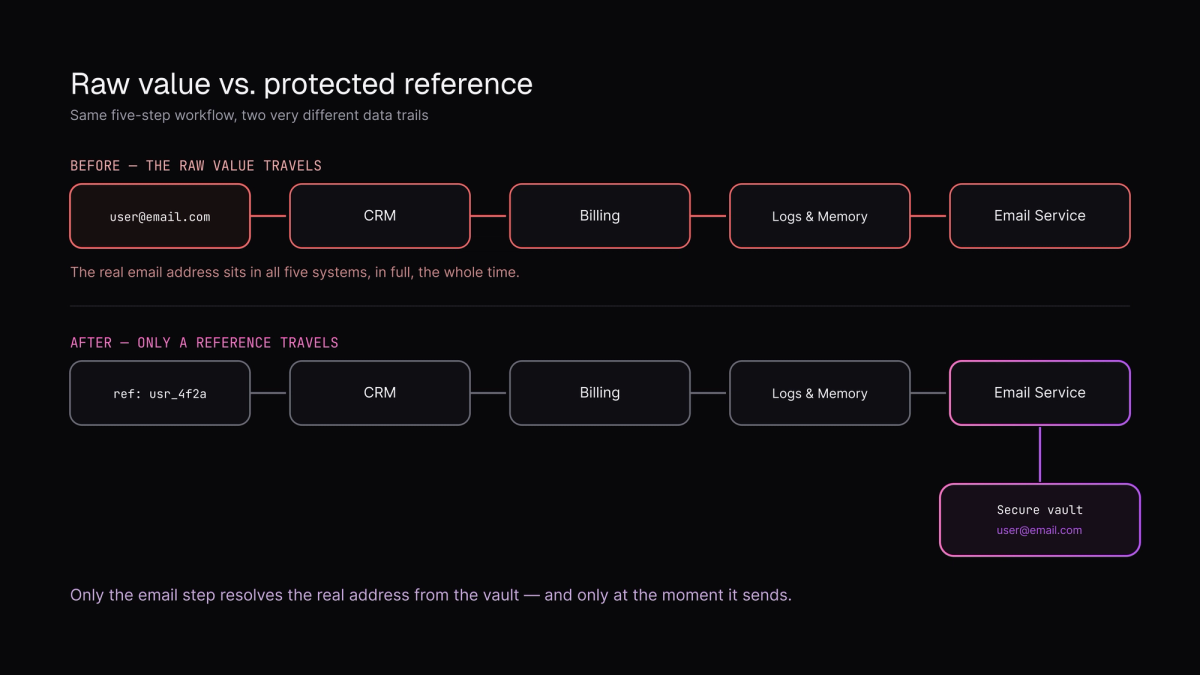
Agent → Billing API↓Application logsAgent tracesAPI monitoringError trackingAnalytics or observability platforms
These systems are useful. Teams need them to understand why an agent made a particular decision, investigate failed tool calls, monitor performance, and debug production issues.
The problem is what gets recorded along the way.
A trace may capture the original prompt. A tool log may include the complete request arguments. An error message might contain part of an API response. A debugging system may store the entire execution chain.
Now imagine that workflow includes customer data.
A customer's email address may appear in the original prompt.
Their account details may appear in a CRM response.
Their transaction information may appear in a payment API response.
Even if the final answer sent to the customer contains none of that sensitive information, copies of it may already exist elsewhere in the workflow.
This is where AI agents create a different kind of visibility problem.
The more observable an agent becomes, the more information teams can potentially collect about what happened during execution. But observability and data exposure need to be balanced carefully.
You want enough information to answer questions like:
- Why did the agent call this tool?
- What caused the request to fail?
- How long did the workflow take?
- Which step produced an incorrect result?
But you do not necessarily need every system involved in answering those questions to store the customer's original sensitive data.
This distinction matters.
You need visibility into what happened. You do not always need visibility into the raw value that was involved.
That is an important design challenge for modern AI applications.
Because once data enters logs, traces, memory, and monitoring systems, controlling where it travels becomes much more difficult than controlling a single database or API.
And as agents become capable of handling longer, multi-step workflows, the number of invisible destinations can grow alongside the number of tools they call.
Every Tool Call Expands the Data Boundary
An AI agent does not need to expose data intentionally for the data boundary to expand.
It can happen naturally as the workflow progresses.
Imagine an agent receives a customer request and needs to complete it using several connected tools.
The first tool identifies the customer.
The second retrieves their account information.
The third checks recent transactions.
The fourth searches internal documentation.
The fifth creates a support ticket.
By the time the agent reaches the fifth step, it may have accumulated information from all the previous ones.
This creates an important difference between a simple API workflow and an agent workflow.
In a traditional application, developers usually define the exact data flow in advance.
A service sends a specific payload to another service. The next system receives exactly what the developer intended to send.
With an AI agent, the workflow can be more dynamic.
The agent may receive information from one tool, interpret it, include part of it in its reasoning or context, and then use that context when deciding which tool to call next.
The data boundary can therefore expand with the workflow.
For example:
Customer request→ Customer ID
CRM lookup→ Customer ID + name + email + phone number
Billing lookup→ Invoice history + payment information
Support ticket creation→ Agent summary containing information collected from previous steps
Not every system in that chain necessarily needs access to everything the agent has seen.
The support system may only need a short description of the issue.
The billing system may only need an account reference.
The email service may only need the recipient address and final message.
But if raw data is continuously carried forward through the agent's context, systems can receive far more information than is required to perform their specific task.
This is where data minimization becomes important for agent architecture.
Instead of thinking:
“What information does the agent have?”
Teams need to think:
“What information does this specific step actually need?”
That shift can significantly change how an agent workflow is designed.
A tool should receive the minimum information required to perform its operation. A downstream service should not automatically inherit everything returned by previous tools. And sensitive values should not have to remain present throughout the entire execution just because they were required at one stage.
Because when an agent calls ten tools, the real risk is not necessarily ten individual security failures.
Sometimes, the problem is much simpler.
Sensitive data was allowed to travel through all ten when only one or two actually needed it.
Context Can Become the Biggest Data Container
One of the easiest things to overlook in an AI agent workflow is the context itself.
As an agent works through a task, it receives information from different sources. A CRM returns customer details. A database returns account information. A payment API returns transaction status. An internal search tool retrieves documents.
The agent now has access to all of this information.
Some of it may be needed for the next step.
Some of it may no longer be relevant.
But unless the workflow is designed to control what moves forward, information from previous steps can continue travelling with the agent.
For example, an agent may retrieve a customer record containing:
- Name
- Email address
- Phone number
- Account ID
- Billing address
- Recent orders
- Payment status
The next tool might only need the account ID.
Yet the agent's working context may still contain the complete customer record.
This creates an unnecessary exposure problem.
The more information that remains inside the agent's context, the more information can potentially be included in future prompts, tool calls, traces, or agent memory.
Over time, context can become a temporary container for far more sensitive data than the current operation actually requires.
This is particularly important in longer-running agent workflows.
An agent may complete ten, twenty, or even more steps. Information collected during step two could still be present when the agent reaches step fifteen. A value that was necessary for one API call may continue existing in the workflow long after its purpose has ended.
That makes controlling data flow more difficult.
The goal should not simply be to give an agent access to less data overall. Sometimes the agent genuinely needs sensitive information to complete a task.
The more important question is:
Can the agent use the information it needs without carrying the raw value through every subsequent step?
For example, instead of passing a customer's real email address, account number, or other sensitive identifier throughout the workflow, the application can use a secure reference that represents that value.
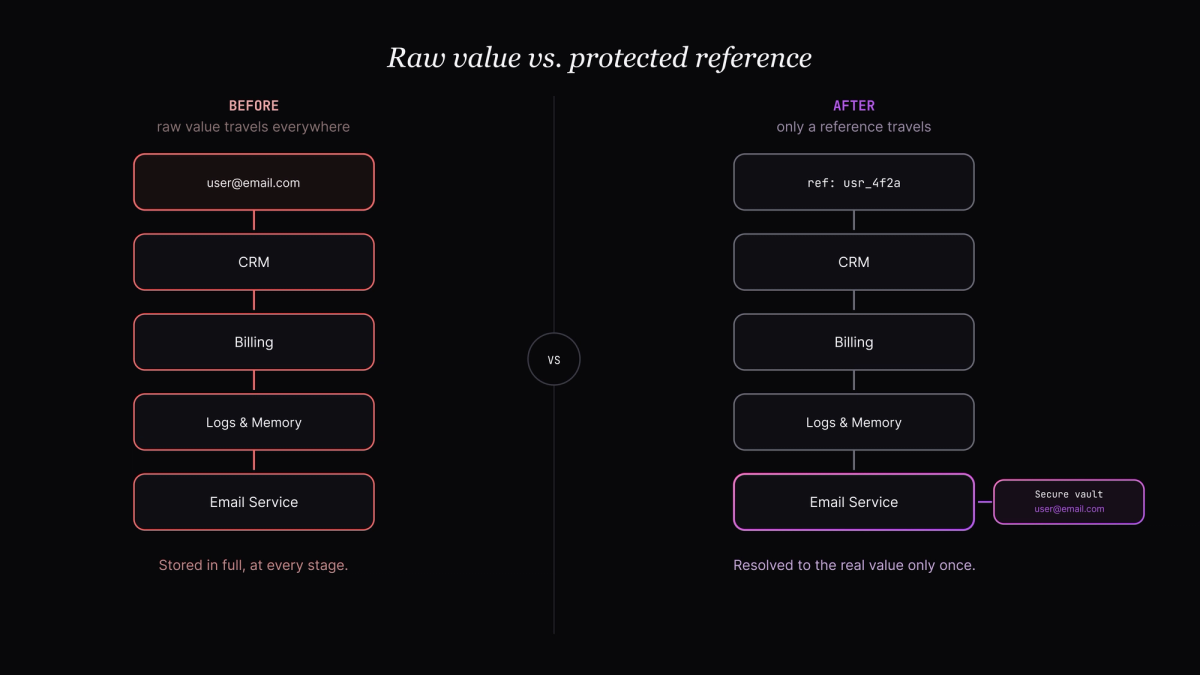
The agent can continue working with the reference, while the real value remains protected and is only retrieved when a specific operation genuinely requires it.
This changes the data flow from:
Sensitive data → Agent → Tool → Agent → Tool → Logs → More tools
to something closer to:
Sensitive data → Protected reference → Agent workflow → Controlled access when required
The difference may seem small at first.
But when an AI agent interacts with ten different tools, reducing the number of places where the original sensitive value exists can make a significant difference.
Because the question is not just whether the agent can complete the task.
It is also whether the task can be completed without making the customer's raw data travel everywhere the agent goes.
Conclusion
AI agents can connect to multiple tools, APIs, and systems to complete a single task. But every additional connection can create another path for sensitive data.
The key question is simple:
Does every system actually need the original data?
A tool may need an account reference, while another may need the real value for one specific operation. Logs and monitoring systems may only need metadata.
Instead of allowing raw sensitive data to travel through the entire agent workflow, applications can replace it with secure references and retrieve the original value only when necessary.
As agents become connected to more systems, securing the model alone is not enough.
The real challenge is controlling where the data goes.
An AI agent should be able to orchestrate information without distributing sensitive data everywhere it travels.
FAQ
Want to tokenize sensitive data before it reaches your AI stack?
Talk to Securelytix →