
Tokenization Is Only Half the Story: Why Data Protection Needs Visibility
Tokenization is one of the most effective ways to reduce sensitive data exposure across APIs, services, AI workflows, and analytics pipelines. But replacing PII with tokens is only part of the equation. Security, engineering, and compliance teams also need visibility into how data protection is performing without exposing the underlying sensitive values. This article explores why privacy-first analytics, protection metrics, field-level insights, and operational visibility are becoming essential components of modern data protection.
By Securelytix

Introduction:
Tokenization is a straightforward idea: take sensitive data and replace it with a safe reference.
An email address becomes a token. A phone number becomes a token. Other sensitive fields can be protected in the same way, allowing applications to continue working without passing the original value through every downstream system.
That solves an important problem.
But it creates another question:
How do you know what is actually being protected?
In a real application, sensitive data doesn't exist in just one place. It can move through APIs, services, logs, AI systems, analytics pipelines, and third-party tools. A team may have a tokenization layer in place, but without visibility into its activity, it can be difficult to understand whether that protection is working as expected.
This is where data protection needs an analytics and visibility layer.
The goal isn't to expose the sensitive data again. Quite the opposite.
The goal is to understand protection activity without exposing the protected values themselves.
What Tokenization Actually Solves
Before talking about visibility, it is important to understand what tokenization is actually solving.
Sensitive data becomes difficult to protect when it is allowed to travel through every part of an application in its original form.
Consider a simple API request containing a customer's name, email address, and phone number.
Without a protection layer, those values may be passed between multiple application components and services. Depending on the architecture, they may also end up in places such as logs, analytics systems, AI workflows, or third-party tools.
The more systems that handle the original values, the more places an organization has to think about when securing that data.
Tokenization changes this flow.
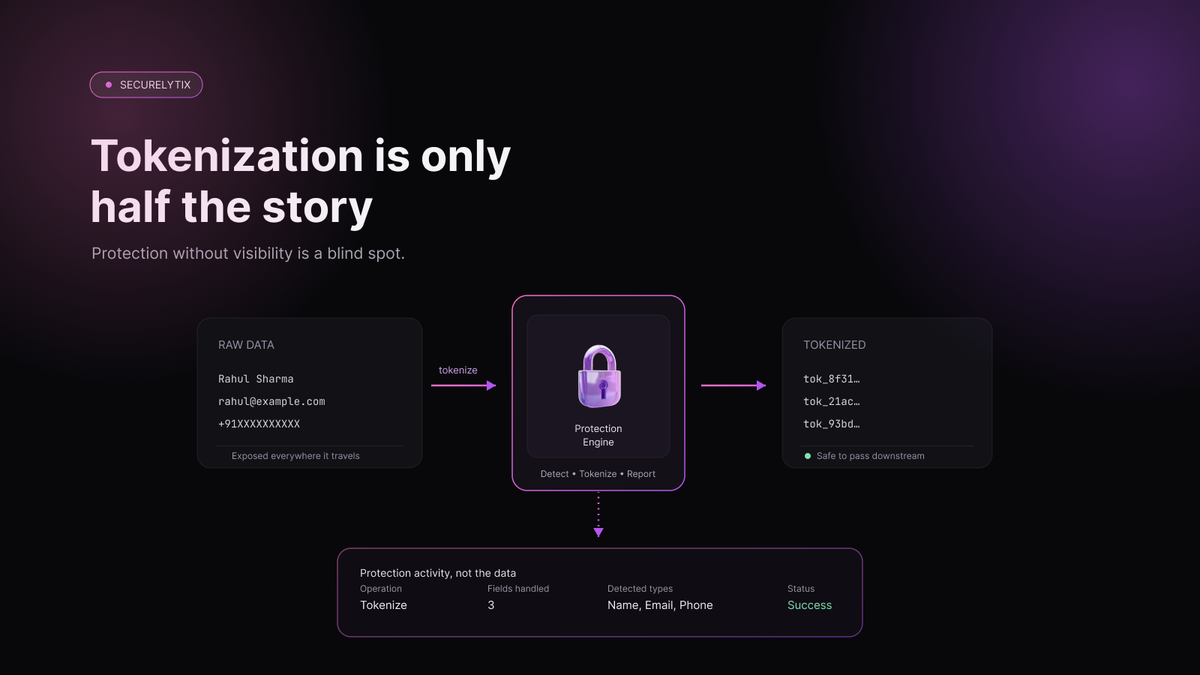
Instead of passing the original sensitive value downstream, the protection layer detects the sensitive field and replaces it with a safe token.
For example:
Original data
Name: Rahul Sharma
Email: rahul@example.com
Phone: +91XXXXXXXXXX
becomes:
Tokenized data
Name: tok_8f31...
Email: tok_21ac...
Phone: tok_93bd...
The application can continue processing the request using these tokens without needing the original values at every stage.
The Securelytix protection engine is designed around this tokenize and detokenize flow: sensitive fields are detected and replaced with tokens, while authorized operations can later restore the original values when required.
This creates a useful separation between the systems that process data and the system that protects the sensitive values.
Reducing the Exposure Surface
The biggest benefit of tokenization is not that the data disappears.
It is that the original value doesn't need to be exposed everywhere.
If an application only needs to work with a token, there is no reason for every downstream component to receive the underlying sensitive value.
That can reduce the number of systems, services, and workflows that need direct access to sensitive information.
For example, an application may need to identify a customer or correlate records without repeatedly passing their actual email address through every service.
A token can act as the safe reference instead.
When the original value is genuinely required, an authorized detokenization operation can restore it.
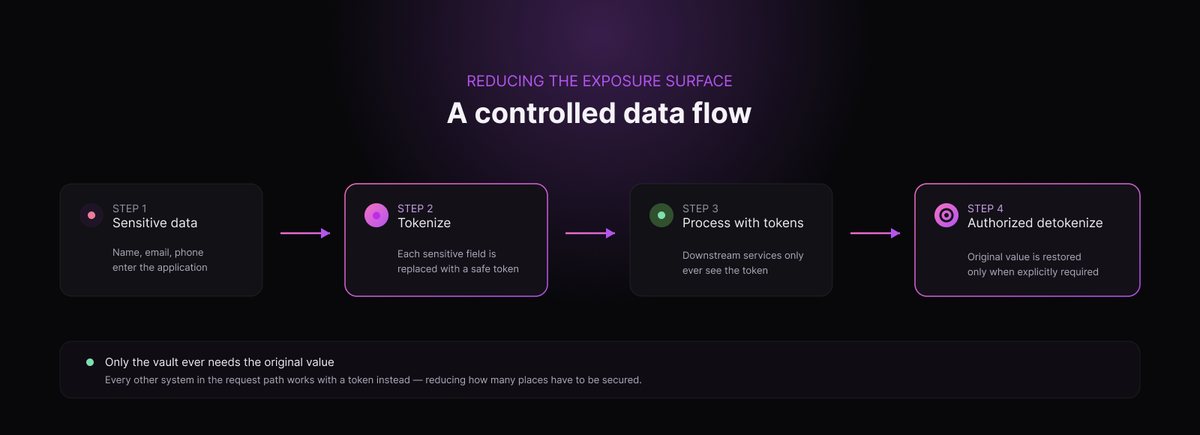
This gives teams a more controlled data flow:
Sensitive data → Tokenize → Process using tokens → Authorized detokenization when required
But Tokenization Doesn't Answer Everything
This is where the limitation becomes important.
Knowing that a tokenization layer exists doesn't tell you much about what is happening inside it.
You may know that protection is enabled, but still not know:
- How many tokenize requests are being processed
- How many sensitive fields are being protected
- Which PII types are appearing most frequently
- How often detokenization is being used
- Whether activity has suddenly increased or decreased
- Whether the protection service is actively reporting activity
These are operational questions, not tokenization questions.
And once a protection layer is running in production, those questions become important.
A security team may want to understand the organization's PII exposure patterns.
An engineering team may want to know whether the vault is receiving traffic as expected.
A customer or account owner may want to understand usage against their plan.
Tokenization provides the protection mechanism.
It doesn't, by itself, provide the visibility into that protection.
That is the gap the next layer needs to address.
And this is why data protection cannot stop at replacing sensitive values with tokens. Organizations also need a way to understand what that protection is doing without turning the visibility layer into another source of sensitive-data exposure.
Protection Without Visibility Creates a Blind Spot
Imagine a company has successfully deployed a tokenization layer.
The integration is working. Sensitive fields are being replaced with tokens, and the application continues to process requests as expected.
From an engineering perspective, it may look like the problem is solved.
But then someone asks a simple question:
How much sensitive data are we actually protecting?
That question can be harder to answer than expected.
A security team may want to know how many tokenize operations happened today. A compliance team may want to understand which types of PII are being handled. An engineering team may want to know whether the protection layer is actively receiving traffic. A customer or account owner may simply want to understand how much of their plan they have consumed.
Without a dedicated visibility layer, answering these questions often means looking through application logs, infrastructure monitoring tools, or custom reports.
That creates a gap between having data protection and being able to understand it.
Protection activity is still activity
Every time a sensitive field is detected and protected, something happens.
A request reaches the vault.
Sensitive fields are identified.
Those fields are tokenized.
The operation succeeds or fails.
The vault can report activity about what happened.
That activity contains useful information even when the original sensitive values remain hidden.
For example, instead of exposing:
rahul@example.com
+91XXXXXXXXXX
a system can report:
Operation: Tokenize
Fields handled: 2
Detected types: Email, Phone
Status: Success
The security team doesn't need to see Rahul's email address or phone number to understand that protection occurred.
This is the key idea behind data-protection visibility:
You can measure protection without exposing the data being protected.
From “Is it protected?” to “What is happening?”
Once protection is running in production, visibility helps answer a broader set of questions.
- Is protection activity consistent with expected application traffic?
- Which sensitive data types are being detected most often?
- Are tokenize operations increasing or decreasing?
- How frequently are detokenization operations being performed?
- Is the protection service reporting recent activity?
- How much usage has accumulated during the current month?
These aren't just dashboard metrics.
They provide context around how sensitive data moves through an application and how the protection layer is being used.
This is particularly important for teams operating distributed applications, where sensitive data can pass through many services before reaching its final destination.
A protection layer can reduce exposure at the boundary. Visibility helps teams understand what happens after that protection is in place.
The goal is not more monitoring
There is also a difference between data-protection visibility and general infrastructure monitoring.
Infrastructure tools are designed to answer questions such as:
Is the service running?
Is CPU usage normal?
Are requests failing?
Those questions remain important.
But they don't necessarily answer:
How many sensitive fields did we protect?
What types of PII were detected?
How much tokenization activity happened?
A data-protection dashboard focuses on this missing layer of information.
It gives engineering, security, and compliance teams a view of protection activity without turning the dashboard itself into another place where raw sensitive data is exposed.
That distinction matters.
The purpose of visibility isn't to create another copy of the data.
It is to create a clear picture of the protection around the data.
And once teams can see that picture, they can start making better decisions about how their sensitive data is being handled.
Security Visibility Should Not Mean Exposing Sensitive Data
There is an important principle when building analytics for data protection:
The system that tells you how well your data is protected should not become another place where that data is exposed.
It sounds obvious, but it is easy to get wrong.
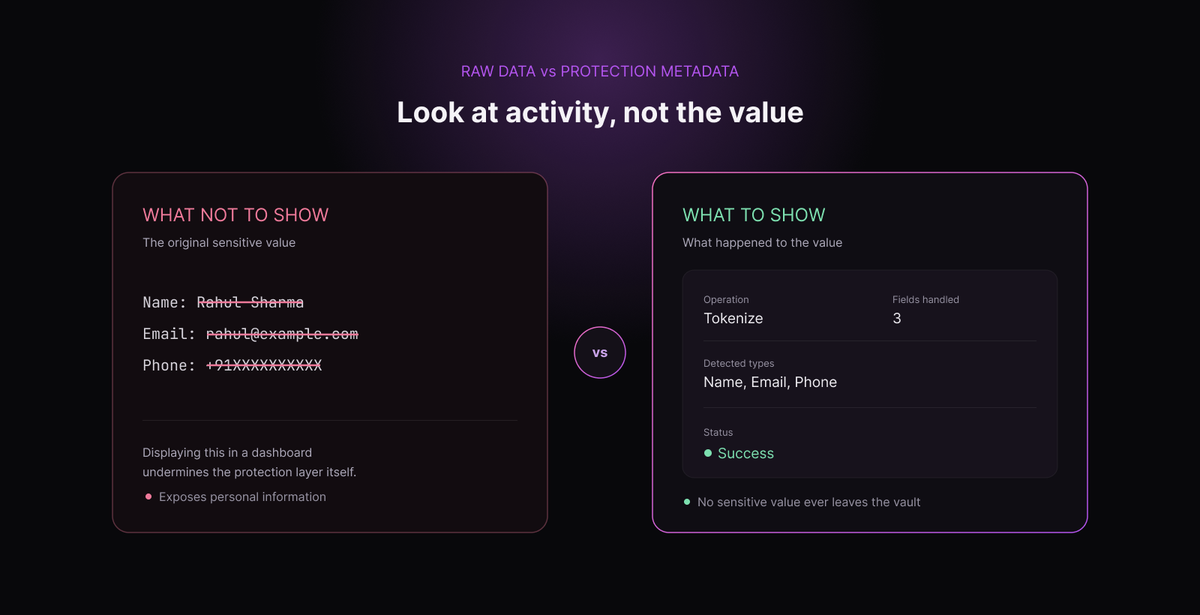
If a company is tokenizing email addresses, phone numbers, names, or other sensitive fields to reduce exposure, displaying those original values in an analytics dashboard would undermine the purpose of the protection layer.
The dashboard does not need to show the data itself.
It needs to show what happened to the data.
Look at activity, not the value
Consider a request containing:
Name: Rahul Sharma
Email: rahul@example.com
Phone: +91XXXXXXXXXX
A useful analytics system doesn't need to display any of those values.
Instead, it could show:
Operation: Tokenize
Fields handled: 3
Detected types: Name, Email, Phone
Status: Successful
That is enough to understand the protection activity without revealing the underlying personal information.
The distinction is important:
Raw data tells you what the value is.
Protection metadata tells you what happened to the value.
For most operational and security questions, the second is what teams actually need.
What should a protection dashboard show?
A useful data-protection dashboard can focus on a small set of meaningful metrics.
Protection volume
How many tokenize and detokenize requests were processed?
Sensitive fields
How many individual sensitive values were handled?
PII types
What types of sensitive information are being detected most frequently?
Classification
How does detected activity break down across PII, PHI, and other categories?
Activity over time
Is protection activity stable, increasing, decreasing, or showing unexpected spikes?
Performance
What kind of latency is being introduced by the protection layer?
Usage
How much API capacity has been consumed during the current billing or plan period?
Service activity
Has the protection service recently reported activity?
These metrics provide meaningful operational context while keeping the actual sensitive values out of the dashboard.
Securelytix defines these as core customer-facing analytics, including request counts, field counts, PII breakdown, latency, usage, and sidecar status.
Privacy should apply to the analytics layer too
There is another side to this problem.
It's not enough to hide the PII values. The analytics themselves also need to be properly isolated.
If multiple customers use the same protection platform, one customer's activity should never become visible to another customer.
Each customer should see the metrics associated with their own workspace.
This is especially important for security products because the analytics can themselves reveal useful information about a company's systems and data activity.
A customer-facing dashboard therefore needs strong tenant isolation alongside data protection.
In Securelytix, the customer dashboard is scoped to the authenticated customer's workspace, while administrative analytics remain separated from customer-facing routes.
The principle is simple
A good data-protection analytics layer should answer:
What was protected?
How much was protected?
What type of sensitive data was detected?
When did the activity happen?
Is the protection layer working as expected?
It should not need to answer those questions by showing the underlying personal information.
That's the difference between visibility and exposure.
The objective isn't to make sensitive data easier to see.
It is to make the protection around sensitive data easier to understand.
And that is what makes visibility a natural extension of data protection rather than a new privacy risk.
Requests Are Not the Same as Fields
Once teams start looking at protection activity, one distinction becomes particularly important:
A request is not the same thing as a sensitive field.
It sounds simple, but the difference can have a significant impact on how protection metrics are interpreted.
A request represents an API call made to the protection layer.
A field represents an individual sensitive value handled within that request.
One request can contain multiple sensitive fields.
For example, consider an application sending this request:
Name: Rahul Sharma
Email: rahul@example.com
Phone: +91XXXXXXXXXX
From an API perspective, this is one request.
But the request contains three sensitive fields:
- Name
- Phone
If the application makes 100 similar tokenize calls, the protection system could record:
100 requests
and approximately:
300 sensitive fields
Neither number is incorrect.
They are simply measuring different things.
Why the distinction matters
Imagine looking at a dashboard and seeing 100 tokenize requests.
At first, that tells you how much API activity occurred.
But it doesn't tell you how much sensitive data was handled inside those requests.
A request containing one sensitive field and a request containing ten sensitive fields are both still one request.
This is why field-level metrics provide another layer of context.
Request counts help teams understand how often the protection API is being called.
Field counts help them understand how many sensitive values are being handled.
Both are useful, but they answer different questions.
A simple example
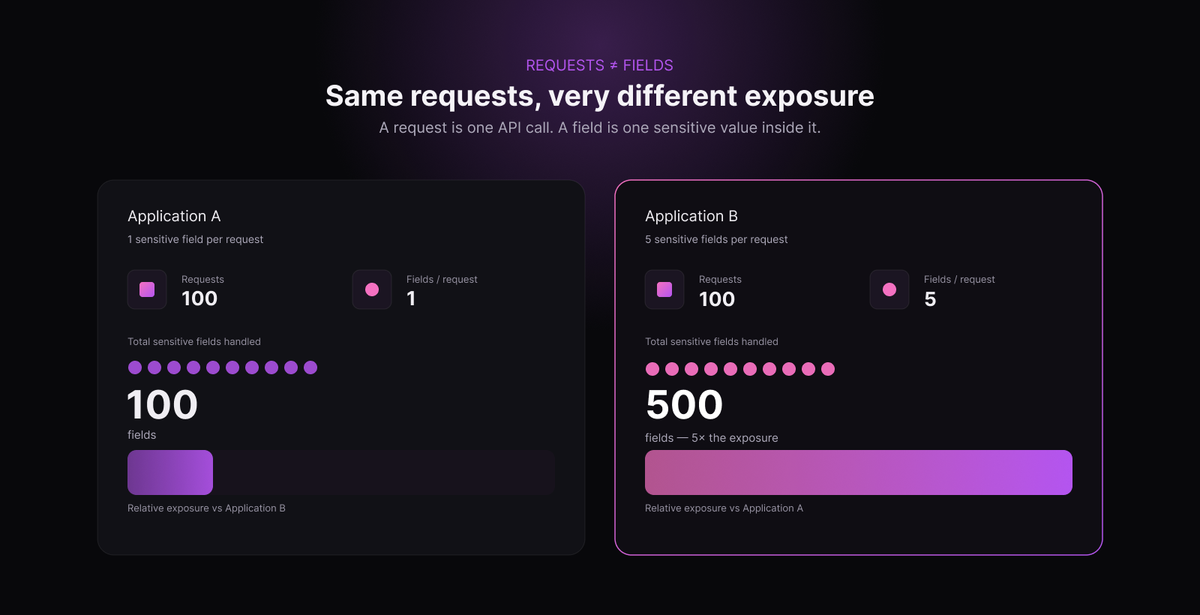
Consider two applications.
Application A
100 requests
1 sensitive field per request
= 100 fields
Application B
100 requests
5 sensitive fields per request
= 500 fields
Both applications generated exactly the same number of requests.
But Application B handled five times as many sensitive fields.
If a dashboard only showed request volume, that difference would be invisible.
Adding field-level metrics makes the protection activity easier to understand.
Metrics need context
This also explains why different numbers on a security dashboard should not always be expected to match.
A monthly API usage number may represent overall request consumption, while a selected activity window may show only the requests that occurred during that period.
Similarly, a tokenize count can represent requests while a PII metric can represent detected fields.
The numbers are related, but they aren't interchangeable.
Good data-protection analytics should therefore make the meaning of each metric clear instead of presenting several numbers without context.
This becomes especially important when teams are investigating unusual activity or validating whether a new integration is behaving as expected.
The bigger lesson
Security metrics are useful only when people understand what they measure.
For data protection, that means distinguishing between:
Requests — how many protection API calls occurred.
Fields — how many sensitive values were handled.
PII detections — what types of sensitive information were identified.
Once these concepts are separated, protection activity becomes much easier to interpret.
And that clarity is important because the purpose of analytics isn't simply to produce more numbers.
It is to help teams understand what is happening to their sensitive data without needing to expose the sensitive data itself.
FAQ
Want to tokenize sensitive data before it reaches your AI stack?
Talk to Securelytix →